Subjective: A Handwritten Typeface for Warm, Airy Design
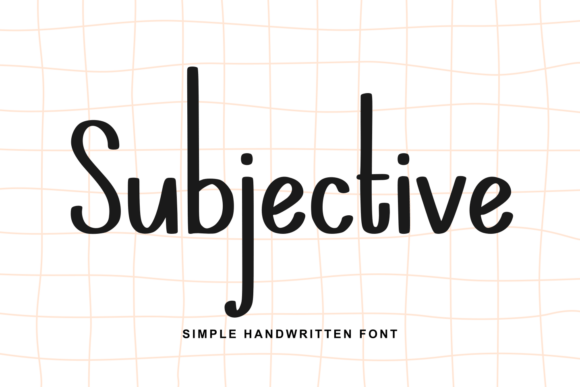
Subjective is a lighthearted handwritten typeface designed to evoke carefree moments—think open skies, smooth ocean horizons, and unhurried holiday days. Its tall, slender letterforms feature soft curves, elongated strokes, and gently rounded edges. Rather than mimicking rigid calligraphy or precise penmanship, Subjective embraces subtle imperfection: each character follows a relaxed, human rhythm that feels personal and approachable while maintaining strong legibility.
This isn’t a font built for dense body text or technical documentation. Instead, Subjective serves as a deliberate stylistic choice—one that communicates warmth, ease, and authenticity. It’s crafted with intention, not randomness: the spacing, stroke contrast, and baseline consistency are carefully tuned so that the “handmade” quality doesn’t compromise clarity at common display sizes.
Why Designers Consider Subjective
Designers often explore handwritten typefaces when they need to soften a brand’s tone, add personality to editorial layouts, or reinforce themes of relaxation, creativity, or intimacy. Subjective stands out in this category because it balances expressiveness with restraint. Unlike many script fonts that rely on dramatic flourishes or tight connections between letters, Subjective uses generous letter spacing and open forms—making it more versatile for digital interfaces and responsive layouts.
Its appeal tends to cluster around specific goals: establishing an inviting visual identity for wellness brands, lifestyle blogs, or boutique services; enhancing seasonal campaigns (e.g., summer promotions, travel announcements); or adding gentle emphasis within otherwise neutral typographic systems. Because it avoids sharp angles or mechanical uniformity, it can help counterbalance sterile or overly corporate aesthetics without veering into childish or informal territory.
Practical Benefits and Real-World Tradeoffs
One of Subjective’s core strengths is its readability at medium to large sizes—especially in headings, logos, and short-form signage. The tall x-height and generous counters (the enclosed spaces inside letters like ‘a’, ‘e’, or ‘o’) support quick character recognition, even on screens with variable resolution. Its consistent rhythm also makes it easier to pair with clean sans-serif companions (e.g., Inter, Poppins, or Lato) for balanced hierarchy.
However, those same qualities introduce constraints. Subjective is not optimized for long paragraphs. Its relatively low stroke contrast and flowing structure reduce scanning efficiency in extended text, particularly at smaller sizes or on lower-DPI displays. It also lacks extensive language support in many releases—so users working with multilingual content may encounter missing glyphs or inconsistent diacritic rendering.
Another consideration is licensing and technical implementation. Like most premium handwritten fonts, Subjective typically requires a commercial license for client-facing or revenue-generating use. Web use demands proper font hosting and fallback strategies; relying solely on system fonts or generic web-safe alternatives won’t preserve its intended character. Performance-conscious projects should weigh file size and loading behavior—especially if only one or two weights are available.
When Subjective Fits Well
Subjective works best in contexts where tone matters as much as information delivery. It’s a strong candidate for:
- Branding materials for mindful living studios, coastal retreats, or artisanal food producers—where calm, sincerity, and natural rhythm align with audience expectations;
- Digital landing pages focused on a single emotional hook (e.g., “Breathe Easy,” “Find Your Pace”)—where concise messaging benefits from expressive typography;
- Print collateral like invitation suites, packaging labels, or illustrated zines—where tactile quality and intentional imperfection enhance perceived authenticity;
- UI elements that benefit from momentary warmth, such as onboarding screens, celebratory notifications, or personalized dashboard greetings.
In each case, success depends less on the font itself and more on how deliberately it’s applied. Using Subjective across every headline, button, and caption dilutes its impact—and risks visual fatigue. Strategic sparingness preserves its expressive value.
When Alternatives May Be More Suitable
If your project prioritizes broad language coverage, high-density text environments (like news sites or academic platforms), or strict accessibility compliance (e.g., WCAG AA/AAA for contrast and letterform distinction), Subjective may fall short. In those cases, consider more robust handwritten options with expanded character sets—or shift toward humanist sans-serifs that suggest warmth through proportion and spacing rather than literal handwriting.
Similarly, if you need strong stylistic variation (multiple weights, italics, small caps), Subjective’s limited family may require pairing with secondary typefaces just to achieve basic typographic hierarchy. Fonts like Quicksand, Comfortaa, or Nunito offer friendlier proportions and wider weight ranges while retaining approachability—though they lack the distinct hand-drawn nuance of Subjective.
Finally, budget and workflow matter. If you’re managing multiple contributors across tools like Figma, Adobe Creative Cloud, and CMS platforms, verifying consistent Subjective availability—and ensuring correct licensing across environments—adds overhead. Open-source or widely distributed alternatives simplify collaboration, especially in early-stage or rapidly iterating projects.
Making a Practical Decision
Before choosing Subjective, ask three questions:
- What emotion or impression must the text convey? If “calm,” “personal,” or “unhurried” are central to your message—and those qualities aren’t already reinforced by imagery, color, or layout—Subjective can reinforce them meaningfully.
- Where and how will people read it? Review your primary use cases: Is it mostly large-scale headings? Short UI labels? Long-form editorial content? Match the font’s strengths to actual usage—not idealized scenarios.
- What constraints shape your implementation? Consider technical requirements (web performance, fallbacks), legal scope (licensing for internal vs. client work), and team capacity (training, consistency checks, version control).
Testing matters too. Render sample text in real contexts—not just mockups. Try Subjective alongside your chosen body font at different sizes, on mobile and desktop, with varying background colors. Observe how it performs under real conditions: Does it remain legible in low-light mode? Does spacing hold up in narrow columns? Does it feel cohesive next to photography or illustrations?
Ultimately, Subjective is a tool—not a solution. Its value emerges when matched thoughtfully to purpose, audience, and environment. For designers seeking a handwritten voice that feels grounded, breathable, and quietly confident, it offers a distinctive option. But like any expressive typeface, its effectiveness depends entirely on how intentionally it’s used.