Meliga: A Modern Classy Script Font That Feels Hand-Drawn—Without the Hours of Work
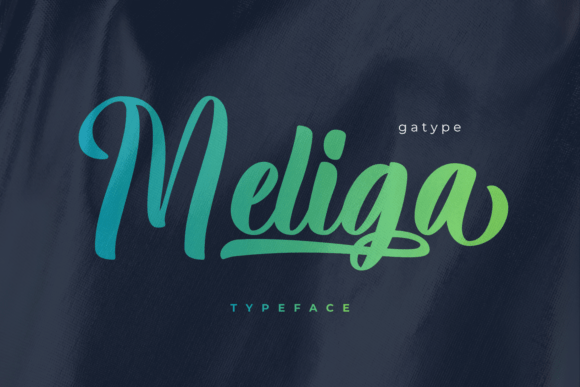
If you’ve ever spent 45 minutes tweaking letter spacing in a logo mockup, only to realize it still looks stiff—or if you’ve stared at a blank Canva canvas wondering how to make your small-batch candle label feel warm and intentional—you’re not overthinking it. You’re just missing Meliga. This isn’t another “elegant script” that leans too formal or too fussy. Meliga is a bold, smooth, expressive handwritten font designed by Gatype to deliver genuine hand-lettered energy—fast.
What Makes Meliga Different From Other Script Fonts?
Most script fonts fall into one of two camps: ultra-refined (think calligraphy competitions) or casual-and-loose (great for chalkboard menus, less so for premium skincare branding). Meliga lives confidently in the middle. Its strong strokes give it presence on packaging or signage; its circular flow keeps it feeling organic—not rigid, not sloppy. It’s the kind of typeface that reads like someone wrote it with care and confidence, not hesitation or overcorrection.
That balance comes from deliberate design choices: consistent baseline rhythm, generous x-height for readability, and subtle variations in stroke weight that mimic natural pen movement—without relying on complex OpenType alternates that require technical know-how to activate. You install it, type, and it just works.
For Small Business Owners Building Their First Brand Identity
Imagine launching a local pottery studio. You need a logo that feels grounded, human, and quietly confident—not trendy or disposable. Meliga Bold Script gives your shop name weight and warmth in one go. Pair it with a clean sans-serif for body text, and you’ve got a full visual system that communicates craft and care without saying a word. No designer needed—just smart typography that supports your story.
For Educators and Content Creators Designing Learning Materials
A high school art teacher printing workshop handouts doesn’t need ornate flourishes—but they *do* need clarity and approachability. Meliga’s lowercase letters are highly legible, even at smaller sizes, and its friendly rhythm helps break up dense text blocks in student-facing PDFs or printed guides. Bonus: because it includes full punctuation, multilingual support, and PUA-encoded glyphs, it handles quotes, em dashes, and accented characters (like café or naïve) without breaking layout.
For Freelancers Pitching to Clients Who Value Craft
You’re designing a wedding invitation suite for a couple who met hiking in Patagonia. They want elegance—but not stuffiness. Meliga delivers that quiet sophistication in the names and date line, while leaving room for watercolor illustrations or minimalist line art. And because it comes in both .otf and .ttf formats, it works reliably across Adobe apps, Figma, and even Google Docs via add-ons—no last-minute font substitution panic before sending a proof.
For Bloggers and Social Media Managers Adding Personality to Visuals
Think beyond headers. Meliga shines in Instagram quote graphics, Pinterest pins with short affirmations (“Breathe deep. Begin again.”), or email newsletter banners where tone matters as much as content. Its bold character holds up well against textured backgrounds or soft gradients—and because it’s smooth rather than jagged, it scales cleanly from mobile thumbnails to desktop hero images.
What You’ll Actually Use—Not Just Install
Meliga includes complete uppercase and lowercase sets, numbers, symbols, and punctuation—so you’re not hunting for a missing ampersand or struggling to type “$24.99” without awkward gaps. The multilingual support means it handles common European languages out of the box (French, Spanish, German, Portuguese), making it practical for creators serving global audiences—even if they’re just selling digital planners on Etsy.
The OpenType features aren’t flashy—but they’re useful. Standard ligatures soften common letter pairs (like “fi” or “fl”) for more natural flow; case-sensitive forms adjust punctuation height when mixing caps and lowercase—small details that add polish without extra effort.
When Meliga Might *Not* Be the Right Fit
It’s not meant for long paragraphs of body text—scripts rarely are. If your project needs extended reading (like an e-book or blog post), pair Meliga with a neutral, highly readable serif or sans-serif for the main copy. Also, while its boldness gives it impact, it may feel too strong for ultra-minimalist tech startups aiming for cool detachment. In those cases, a lighter script or geometric sans would align better with brand voice.
And if you’re working in environments with strict font licensing rules—like certain enterprise CMS platforms or government communications systems—double-check usage rights. Meliga is licensed for commercial use, but always verify permissions for embedded web fonts or app integration.
How to Start Using Meliga—Today
Download the .otf or .ttf file, install it through your operating system, and open your design tool. Try it first on something low-stakes: rename a folder (“Q3 Brand Refresh”), draft a social caption (“New batch just landed ✨”), or reformat a client email subject line. Notice how quickly it shifts tone—not just “fancier,” but more intentional, more human.
You don’t need to master kerning or OpenType panels to benefit. Start simple: use Meliga for headlines, logos, product names, or short quotes. Let its circular flow do the work. Then, as you get comfortable, explore pairing it with contrasting typefaces—like a sturdy mono-spaced font for labels or a light geometric sans for captions—to build visual hierarchy that feels curated, not chaotic.
Meliga won’t replace every font in your library—but it fills a specific, frequent gap: the need for bold, elegant, hand-drawn energy that’s ready when you are. Not someday. Not after a tutorial. Right now.