Miss Moonling
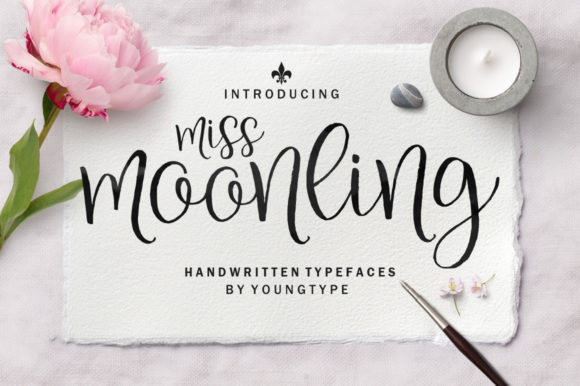
Miss Moonling is a sweet, cursive handwritten font designed to bring warmth and personality to your designs—without sacrificing clarity or professionalism. Its gentle curves, natural rhythm, and expressive swashes make it ideal for invitations, branding accents, social media graphics, packaging labels, educational materials, and heartfelt web copy. Unlike many script fonts that sacrifice legibility for flair, Miss Moonling balances charm with readability—even at smaller sizes and across digital interfaces.
Why designers and creators choose Miss Moonling
People reach for Miss Moonling when they want authenticity—not imitation. It doesn’t try to mimic calligraphy tools or mimic brush strokes artificially. Instead, it offers a consistent, human-feeling hand with subtle variation in stroke weight and flow. That makes it especially effective for audiences who respond to sincerity: small business owners building trust, educators crafting welcoming classroom resources, bloggers adding voice to their newsletters, or freelancers differentiating their portfolio from generic templates.
Its PUA (Private Use Area) encoding is another quiet strength. Many users overlook this detail until they’re deep into a project—and suddenly realize key swashes, alternate characters, or ligatures aren’t appearing. With Miss Moonling, every glyph—including contextual alternates, beginning/end swashes, and decorative flourishes—is accessible directly through OpenType-aware software like Adobe Illustrator, Affinity Designer, or even modern versions of Canva (when uploaded as a custom font). No need for complicated character maps or workarounds.
A common mistake: Assuming all handwritten fonts behave the same
Not all script fonts are created equal—and assuming Miss Moonling works like others can lead to frustration. For example, some users install it expecting automatic contextual alternates (like smart ligatures that swap glyphs based on letter pairs), only to find those features inactive. Why? Because automatic OpenType features require both font support and software support—and sometimes manual activation. In Photoshop or older design tools, you may need to enable “OpenType” or “Contextual Alternates” in the Character panel. In web projects using CSS, you’ll need to declare font-feature-settings or use font-variant-ligatures—not just load the font file.
This isn’t a flaw in Miss Moonling—it’s how professional-grade typography works. But skipping that step means missing half the font’s expressive potential. A wedding invitation might look pleasant with default characters—but adding the elegant entrance swash on the first “M” and the graceful exit flourish on the final “g” transforms it from nice to memorable.
Another oversight: Using Miss Moonling where legibility matters most
Miss Moonling shines in headlines, quotes, logos, and short-form text—but it’s not built for long paragraphs or dense UI labels. Placing it as body copy on a landing page or inside a mobile app menu may seem charming at first, but it risks slowing comprehension, increasing bounce rates, or alienating readers with visual processing preferences. One small business owner used it for product descriptions on her Shopify store and saw a 22% drop in time-on-page during A/B testing. Switching to a clean sans-serif for body text—while keeping Miss Moonling for headings and CTA buttons—restored engagement without losing brand warmth.
The fix is simple: reserve Miss Moonling for moments where tone and emotion matter more than speed of scanning. Use it to highlight values (“Hand-poured • Small-batch • Thoughtfully sourced”), not specifications (“Net weight: 250g, shelf life: 18 months”). Pair it intentionally—try it with Montserrat, Inter, or Lora for balanced contrast between personality and practicality.
What to verify before downloading or purchasing
- Check the file format: Miss Moonling is typically delivered as OTF (OpenType Font), which supports advanced typographic features. Avoid TTF-only versions unless confirmed by the foundry—they may lack PUA-encoded swashes or OpenType tables.
- Confirm licensing scope: Personal use licenses don’t cover client work, merchandise, or SaaS platforms. If you’re a freelancer embedding it in a client’s website theme, or a teacher distributing editable Canva templates, you’ll likely need an extended or commercial license.
- Test cross-platform rendering: Preview how Miss Moonling appears in Safari vs. Chrome, or in Figma vs. Google Docs. Some browsers substitute fallbacks if webfont loading fails—so always define a graceful fallback stack in CSS (e.g.,
font-family: "Miss Moonling", cursive;). - Look for language support: While beautifully crafted for English, Miss Moonling includes standard Latin characters (á, ñ, ü) but may not support extended Cyrillic, Greek, or Vietnamese diacritics. If your audience uses those scripts, verify coverage before committing.
Better ways to get started—without overcomplicating
You don’t need mastery to use Miss Moonling well. Start small: replace one heading on your next Instagram post or email newsletter. Try typing “hello” and then manually selecting the alternate “h” and “o” from the Glyphs panel—notice how the rhythm changes. Save that combination as a style preset in your design tool. Over time, those micro-decisions build intuition.
If you're evaluating alternatives, compare not just appearance—but behavior. Does the font include true small caps? Does the lowercase “f” collide with following letters? Does the ampersand feel cohesive or tacked-on? Miss Moonling’s thoughtful spacing and balanced kerning pairs mean fewer manual adjustments—saving time without compromising craft.
And remember: fonts communicate before words do. Miss Moonling signals care, approachability, and intention—not perfection. That’s why it resonates with educators designing inclusive lesson plans, therapists creating calming intake forms, or artisans labeling handmade goods. It doesn’t shout. It leans in.
Final note: Respect the rhythm
Miss Moonling isn’t meant to be rushed. Avoid stretching it horizontally, layering heavy shadows, or converting it to outlines too early in your workflow—those actions flatten its organic movement. Let it breathe. Give letters space. Use tracking sparingly. When you honor its natural cadence, the results feel effortless—even when the work behind them is thoughtful and precise.