Luckyday: A Handwritten Font That Fits Naturally Into Your Creative Process
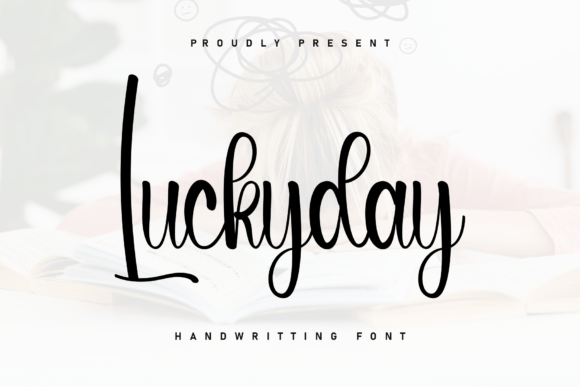
Luckyday is a sweet and beautiful handwritten font—designed not as a decorative afterthought, but as a functional, expressive tool that integrates smoothly into real-world creative workflows. Its characters gently dance along the baseline, lending warmth and personality without sacrificing legibility or intention. Unlike many script fonts that prioritize flourish over function, Luckyday balances rhythm, spacing, and readability so it works where it matters most: in headlines, invitations, product packaging, social media graphics, educational materials, and brand touchpoints that need to feel human—not generic.
Where Luckyday Fits in the Design and Communication Workflow
Fonts aren’t chosen in isolation—they’re selected as part of a sequence: define purpose → choose voice → select type → refine hierarchy → test across contexts. Luckyday enters most naturally at the “choose voice” stage, especially when the goal is approachability, authenticity, or gentle emphasis. It’s rarely the sole typeface in a system—but it excels as a strategic accent. Think of it like adding a handwritten note to a printed letter: it doesn’t replace the structure, but it deepens connection.
Before a project begins, Luckyday helps clarify tone. If you’re drafting a workshop handout for educators, sketching a small-batch candle label, or designing a welcome email for a wellness newsletter, typing a few sample lines in Luckyday reveals whether the energy matches your intent. Does it feel warm but not childish? Playful but not distracting? Personal but still professional? That early alignment saves revision time later.
Using Luckyday During Execution—Not Just Decoration
During active design or content creation, Luckyday shines in roles that benefit from subtle humanity: callouts in digital course modules, short headlines in Canva templates, quotes overlaid on Instagram Stories, or section dividers in Notion dashboards. Because its baseline movement is gentle—not exaggerated—it scales well from 16px body text (in carefully spaced settings) up to 72px display sizes without losing cohesion.
It pairs effectively with neutral sans-serifs like Inter, Open Sans, or Lato. The contrast between Luckyday’s organic flow and a clean, structured companion creates visual hierarchy without competing for attention. For example, a freelance copywriter might use Luckyday for client testimonial pull-quotes in a pitch deck, while keeping body copy in a highly readable sans-serif. That pairing communicates both credibility and care—two qualities clients actively assess.
Compatibility and Technical Integration
Luckyday is available in standard OTF and TTF formats, making it compatible with Adobe Creative Cloud apps (Photoshop, Illustrator, InDesign), Figma, Canva, Affinity Suite, and even Google Docs via third-party add-ons like Extensis Fonts. No special plugins or subscriptions are needed—just install locally or activate through your preferred font manager.
For web use, embed via @font-face with a fallback stack (e.g., "Luckyday", cursive) to ensure graceful degradation. Test rendering across devices: Luckyday displays consistently on macOS and Windows, though subtle hinting differences mean previewing on both platforms during final QA is wise. Avoid using it for long-form web paragraphs—its charm lives in brevity and contrast, not endurance.
Practical Tips for Consistent, Efficient Use
- Limit scope: Assign Luckyday to one specific role per project—e.g., only subheadings, only quote marks, only logo lockups. This builds recognition and avoids visual fatigue.
- Adjust tracking intentionally: Slightly increased letter-spacing (5–10 units in design apps) improves clarity at smaller sizes and prevents crowding in tight layouts.
- Use layer styles sparingly: A soft drop shadow or subtle stroke can enhance legibility on busy backgrounds—but avoid heavy effects that mute its natural texture.
- Proofread in context: Because Luckyday’s lowercase ‘a’, ‘g’, and ‘y’ have distinctive forms, always check how they render next to neighboring letters—especially in all-caps acronyms or mixed-case brand names.
How Luckyday Supports Long-Term Brand and Content Systems
Small business owners and solopreneurs often underestimate how much typography contributes to perceived consistency. Luckyday isn’t a trend-driven novelty—it’s built for reuse. When applied deliberately across touchpoints (email headers, printable resource sheets, video thumbnails, physical thank-you cards), it becomes a quiet signature. That consistency signals intentionality, which builds trust faster than any marketing claim.
Consider an educator launching a paid mini-course. Using Luckyday for worksheet titles and section headers—while keeping lesson text in a clear sans-serif—creates continuity across PDFs, LMS pages, and promotional graphics. Learners begin to associate that gentle rhythm with clarity and care. Over time, that association becomes part of the learning experience itself—not just decoration around it.
Workflow Integration Beyond Design Tools
Luckyday extends beyond static visuals. In productivity tools like Notion or Obsidian, it’s used in custom CSS snippets to style headings in personal knowledge bases—adding warmth to otherwise utilitarian interfaces. Bloggers embed it in WordPress themes for pull-quote blocks, reinforcing voice without slowing load times. Even in print-on-demand workflows, Luckyday translates reliably to sticker sheets, greeting cards, and journal inserts because its outlines are clean and its metrics stable.
One practical observation: Luckyday performs best when paired with intentional whitespace. Crowded layouts overwhelm its subtlety. Give it room to breathe—especially in responsive designs where mobile cropping might cut off ascenders or descenders. A 12px margin around Luckyday-set text in a newsletter template, for instance, preserves its impact without demanding extra attention.
Quality Control and Realistic Expectations
Luckyday isn’t designed for data-heavy tables, legal disclaimers, or multilingual interfaces with complex scripts. It supports Latin-based languages (English, Spanish, French, German, Portuguese, etc.) with full diacritic coverage, but lacks Cyrillic, Greek, or Asian language sets. Knowing those boundaries upfront prevents mid-project detours.
Also worth noting: because it’s a single-weight, single-style font (no bold or italic variants), emphasis must come from size, color, or layout—not typographic variation. That limitation encourages clearer communication: if something needs emphasis, make it bigger or isolate it—not bold it. That constraint often leads to stronger visual decisions.
Making Luckyday Part of Your Routine—Without Overhead
You don’t need to “adopt” Luckyday formally. Start by using it in one recurring context: the subject line of your weekly team update, the title slide of your presentation template, or the header on your printable habit tracker. Track how it affects engagement—do recipients comment on the tone? Do collaborators intuitively mirror its warmth in their own language?
Over time, you’ll develop instinctive judgment about where it adds value—and where it doesn’t. That discernment is more valuable than any font library. Luckyday works best when treated not as a stylistic fix, but as a deliberate choice in a chain of thoughtful decisions: what message are we sending, who’s receiving it, and what feeling should linger after they look away?
When integrated with that level of intention, Luckyday does more than dress up text. It quietly reinforces voice, supports comprehension, and makes space for humanity—in design, in teaching, in selling, in creating, and in connecting.